

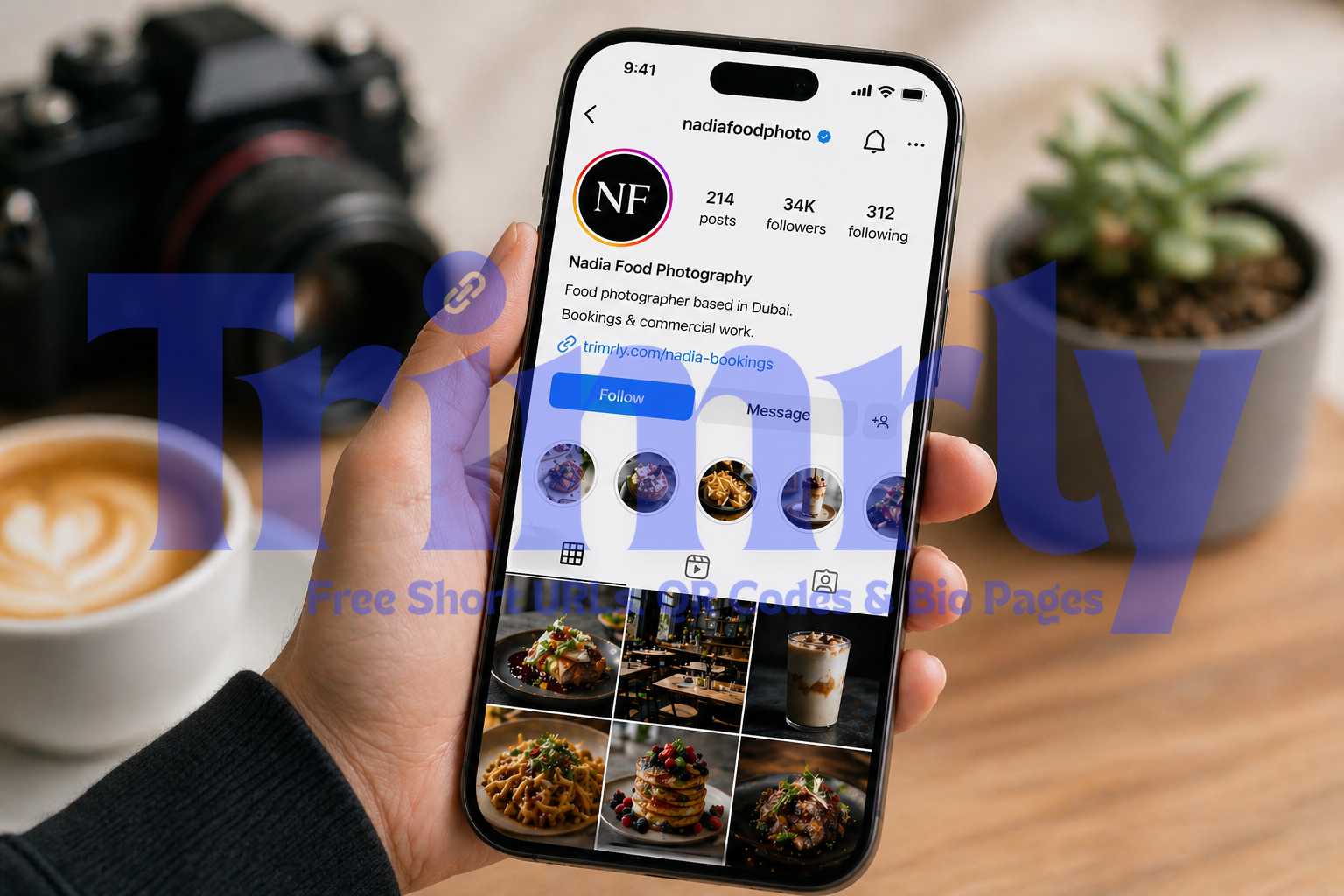
A food photographer in Dubai had 34,000 Instagram followers and 800 to 1,200 profile visits per week. Her bio link pointed to her homepage, which had no clear call to action and took 6 seconds to load on mobile. She was getting maybe 40 clicks a week from all that traffic.
She switched to a short link pointing directly to her booking form. Clicks jumped to 190 per week in the first month. Same follower count, same posting frequency. Just a better link in the right place.
Your Instagram bio link is not a courtesy. It is the only conversion point Instagram gives you for free. Here is how to set it up properly.
Why the Link in Your Instagram Bio Matters So Much
Instagram does not let you add clickable links inside captions or comments. Stories links exist, but only after the first swipe on a sticker that most people miss. The bio link is the one reliable, always-visible, always-clickable path from your Instagram content to anywhere outside the app.
Every post you make, every reel, every story ends with the same implicit direction: go to the link in my bio. If that link goes somewhere unclear or irrelevant, you are losing a significant portion of the traffic your content generates.
Here is what the same bio looks like with a raw URL versus a clean short link:
Bookings & commercial work.
Bookings & commercial work.
Same profile. Same bio text. The raw URL wraps onto a second line, exposes tracking parameters to the visitor, and gives no indication of what is on the other side of the tap. The short link is clean, readable, and specific. A first-time visitor can see the word "bookings" before they even tap it. That context matters.
"Your Instagram bio link is the only clickable exit from your profile. Treat it like a landing page headline, not an afterthought."
Three Ways to Handle Your Instagram Bio Link
Before creating anything, it helps to know which approach fits your situation. There are three realistic options, and they are not interchangeable.
Plain Short Link
One URL, one destination. Best when you have a clear primary goal: booking page, product launch, newsletter signup, latest article. You update the destination inside Trimrly whenever the offer or focus changes, without touching your Instagram bio again.
Best for single-goal profiles
Short Link to a Bio Page
A short link that points to a Trimrly bio page with multiple buttons: your shop, latest post, booking link, YouTube, newsletter. You change individual buttons without changing the short link in your bio. Your followers always land somewhere current and useful.
Best for creators and businesses
Rotating Short Link
One short link that cycles through multiple destinations based on your campaign schedule. You update the destination inside Trimrly as your focus changes: this week it goes to a sale, next week to a new product, the week after to a sign-up form.
Best for active campaign rotation
If you post content about multiple topics or have more than one thing to promote at any time, use a short link pointing to a bio page. It is the most flexible option and requires the least maintenance. If you have one clear, consistent goal, a plain short link is simpler and faster to set up.
How to Create Your Instagram Bio Short Link on Trimrly
The whole process takes about two minutes. Here is every step from zero to a live link in your bio.
Create a free Trimrly account
Go to trimrly.com/user/register. No credit card required. The free plan includes 50 short links per month, full click analytics, and no expiry on your links ever. If you plan to use a bio page, that is included too with 5 free bio pages per month.
Decide on your destination
Copy the exact URL you want Instagram visitors to land on. If it is a product page, your booking form, or a specific article, use that direct URL. Avoid your homepage unless the homepage itself is genuinely the best destination for a first-time visitor from Instagram.
Paste the URL into Trimrly and set a custom alias
Go to trimrly.com, paste your URL, and type a custom alias in the alias field. Use something descriptive and short: your brand name, your name, or what the link leads to. trimrly.com/yourname or trimrly.com/yourname-shop are both clean options that work well in a bio.
Add UTM parameters to your destination URL before shortening
Before you shorten the link, add utm_source=instagram and utm_medium=bio to your destination URL. Instagram strips referrer data just like WhatsApp does, so without UTM tags, every click from your bio shows up as direct traffic in GA4. Tag the URL first, then shorten it, so you get accurate attribution in your analytics.
Copy the short link and paste it into your Instagram bio
Open Instagram, go to Edit Profile, and paste your short link into the Website field. You do not need to include https:// as Instagram adds that automatically. Tap Done. Your short link is now live and tracking every click from this point forward.
Tap your own bio link to confirm it works
Visit your own profile and tap the link. Confirm it redirects to the correct page. Then check your Trimrly dashboard after a few minutes to see that your click registered. If it does, your setup is working correctly and every future click will be tracked automatically.
Create Your Instagram Bio Short Link Free
Tracked short links and bio pages, both on the free plan. No credit card. No expiry. 50 links per month from day one.
Short Link vs Bio Page: What to Put in Your Instagram Bio
This is the question most creators get stuck on. Both are valid. The right choice depends on how many things you are trying to send people to at once.
| Situation | Use a Short Link | Use a Bio Page |
|---|---|---|
| One main goal right now | Ideal | Overkill |
| Multiple links to promote | Not enough | Ideal |
| Seasonal campaign rotation | Update destination | Update buttons |
| You sell products | Works if one SKU | Multiple product links |
| You create content | Works for one platform | YouTube, Spotify, blog |
| Click tracking needed | Per-link analytics | Per-button analytics |
If you are leaning toward a bio page, Trimrly's free bio page builder lets you create one in about five minutes. You add buttons for every destination you want to promote, arrange them in order of priority, and get a clean mobile-optimized page at a Trimrly URL. Then you shorten that bio page URL and use the short link in your Instagram bio. Every button on your bio page tracks its own clicks separately, so you can see which links your Instagram audience actually uses.
What Good Instagram Bio Short Link Tracking Tells You
Most creators check their click count and stop there. That single number is the least useful data your short link produces. Here is what to actually look at and what to do with it.
Click spikes after specific posts
When you post a reel or carousel and caption it with "link in bio," check your Trimrly analytics the same day. A spike in clicks directly after a post tells you that post drove profile visits and converted them into bio link clicks. Track this across 8 to 10 posts and a pattern emerges: certain content types send far more people to your bio than others. Post more of those.
Device breakdown
Instagram is almost entirely mobile. If your bio link click data shows 95% mobile users and your destination page loads slowly or displays poorly on phones, that is a conversion problem you can fix. Device data makes it visible. Without it, you might assume your offer or copy is the problem when it is actually your page speed.
Click timing
Your bio gets clicks throughout the day, not just right after you post. Checking which hours produce the most bio link clicks tells you when your audience is most active on the platform, which is the right time to schedule posts, stories, and reels going forward.
Divide your total bio link clicks by your profile visits for the month. This is your bio conversion rate. Most accounts sit between 3% and 8%. If yours is below 3%, the issue is either the link destination, the clarity of your bio text, or both. If it is above 10%, your bio is doing its job well and your focus should shift to increasing profile visits through content.
Mistakes That Reduce Bio Link Clicks
- ✕
Linking to your homepage every time. Your homepage is built for all audiences. Your Instagram audience is a specific slice of people who already like your content. Send them somewhere specific that matches what they just saw in your posts.
- ✕
Never updating the link. If you promoted a sale in January and your bio link still points to that sale page in March, every click lands somewhere irrelevant and most visitors leave immediately. Update your Trimrly destination URL whenever your campaign changes, without touching your Instagram bio.
- ✕
Using a link that is too slow on mobile. Instagram users tap your bio link on a phone, often on a cellular connection. If your destination page takes more than 3 seconds to load, more than half of those visitors bounce before seeing anything. Test your page speed at Google's PageSpeed Insights before making it your bio link.
- ✕
Not mentioning the link in your content. Your bio link only gets clicked when people visit your profile. People visit your profile when your content makes them curious enough to find out more. Mention your bio link directly in captions, stories, and reels at least twice a week to keep driving profile visits.
- ✓
Matching your link destination to your current content. If your last three posts are about a product launch, your bio link should go to that product page right now. Alignment between your content and your bio link is the single biggest lever for improving bio click conversion rate.
- ✓
Checking analytics weekly, not monthly. Weekly check-ins let you catch problems and opportunities while they are still relevant. A spike in bio clicks after a specific post tells you something about your audience in real time. Monthly reviews are too slow for a channel that moves as fast as Instagram.
QR Codes and Instagram: The Offline Bridge
Short links are for your digital bio. But if you also sell or promote at physical locations, events, or through printed materials, a QR code gives you the offline equivalent of a bio link.
Print a QR code on your business card, packaging, or event table card that links to your Instagram bio page or directly to your short link destination. Anyone who scans it lands exactly where you want them. Every scan is tracked through Trimrly's free QR code generator the same way bio link clicks are tracked: with device, location, and timestamp data.
A skincare brand in Karachi put Trimrly QR codes on their product inserts pointing to their Instagram profile. They tracked 240 scans in the first month and found that most happened within 48 hours of purchase. They used that timing to schedule a follow-up WhatsApp message with a discount on repurchase, sent 48 hours after the order confirmation. Repeat purchase rate increased by 22% in 90 days. The QR scan data told them exactly when to reach out.
Frequently Asked Questions
Instagram allows only one clickable link in the bio field. To share multiple destinations, create a Trimrly bio page with multiple buttons, then use one short link in your bio that points to that bio page. Each button on the bio page tracks its own clicks separately, so you can see which destinations your audience uses most.
Instagram displays the full URL you enter in the bio field, though it truncates very long URLs visually with "..." for display purposes. The link itself is always fully clickable. Instagram does not shorten or track your links. Creating your own short link with Trimrly gives you a clean display URL and full click analytics that Instagram does not provide.
Instagram's native analytics show bio link clicks only in aggregate within Instagram Insights, with no breakdown by time, device, or referral. For detailed tracking, create a short link with Trimrly. Every click is recorded with timestamp, device type, operating system, country, and referrer data. You can also add UTM parameters to the destination URL before shortening so GA4 picks up the attribution correctly, since Instagram strips referrer headers just like WhatsApp does.
Yes. This is one of the main advantages of using a short link. Log into your Trimrly account, find the link, and update the destination URL to wherever you want to send people next. The short link in your Instagram bio stays exactly the same. Your followers tap the same alias and land on the new destination immediately, with no need to edit your bio.
The best Instagram bio link is one that matches your current primary goal and is optimized for mobile visitors. For most creators and businesses, a short link pointing to a bio page performs best because it lets you promote multiple destinations without changing your bio every time something new launches. For accounts with a single consistent goal, a short link pointing directly to that destination is simpler and faster to set up.