A candle maker in Denver, Colorado had 14,000 Instagram followers and a consistent posting schedule. Her content regularly hit 30,000 to 80,000 impressions. Her bio linked to her Shopify homepage. She was getting 40 to 60 website visits per week from Instagram, and her Instagram-driven orders averaged about four per week.
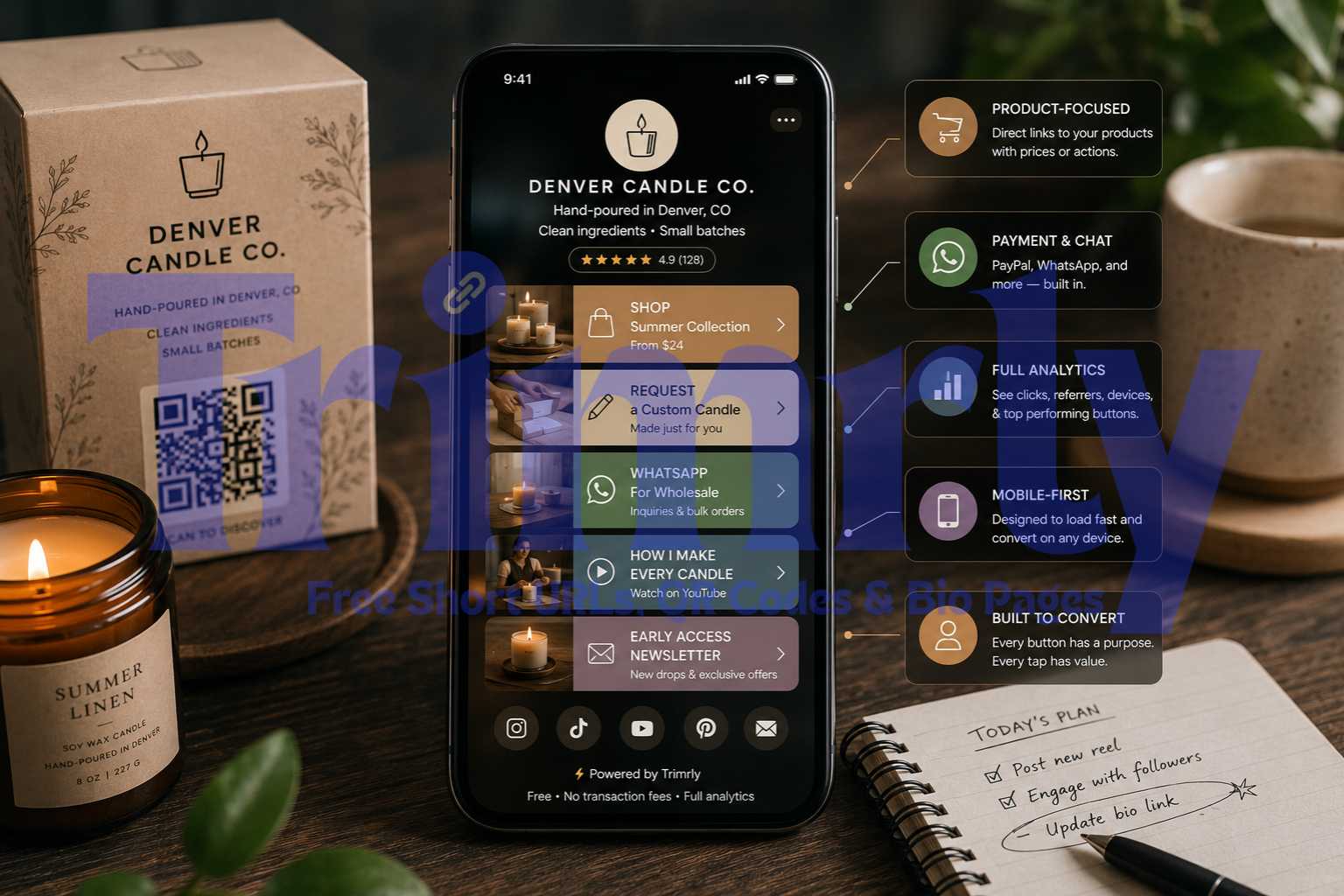
She rebuilt her bio link as a Trimrly bio mini-store with five buttons: her current seasonal collection with the price range, her custom order form, her "how I make candles" YouTube video, a WhatsApp message button for wholesale inquiries, and a newsletter signup for early access to new drops. In the first three weeks, her weekly Instagram-sourced website visits went from 55 to 190. Her Instagram-driven orders went from four per week to eleven.
Nothing else changed. Same followers, same posting cadence, same products. The only difference was giving profile visitors a purpose-built destination instead of a generic homepage they had to navigate before finding what they wanted to buy.
Why Your Homepage Is the Wrong Destination for Instagram Traffic
The person who taps your Instagram bio link is not a cold visitor. They came from your content. They watched your reel, saw your post, read your caption, and decided you were worth clicking through to. That is a high-intent action that deserves a high-intent destination.
Your homepage is designed for someone who has never heard of you. It introduces your brand, explains what you do, presents your full range, and asks the visitor to do the work of finding what is relevant to them. That structure serves Google traffic. It does not serve someone who just watched a 30-second video of your product and is ready to buy.
Homepage Link
Bio Mini-Store
The homepage on the left gives the visitor a navigation bar and four lines of generic content. They arrived from a specific reel about a specific candle. The page tells them nothing specific. Most leave.
The bio mini-store on the right loads immediately with five specific actions, each one labeled with what it does and what it costs or delivers. The visitor who came from the summer collection reel sees "Shop Summer Collection — From $24" as the very first button. One tap. The visitor who came from a wholesale inquiry post sees "WhatsApp for Wholesale" three buttons down. The page works for multiple audience segments simultaneously.
What Goes in an Instagram Bio Mini-Store
A bio mini-store is not a product catalogue. It is a curated set of five or fewer high-intent actions, each one matching a specific reason someone might have tapped your bio link. The curation is what makes it convert at 2.3 times the rate of a single homepage link.
Primary Product or Collection
Your best-selling product, current seasonal collection, or highest-margin item. Always the first button. Include the price or price range in the label. "Shop the Summer Collection — From $24" converts better than "Shop Now."
Button 1, always
PayPal Buy Button or Payment Link
Trimrly's PayPal Button widget lets you add a direct payment link for a specific product or service amount. The buyer taps, pays, and you receive the money without the visitor leaving the bio page for a checkout flow.
Reduces checkout friction
WhatsApp Message or Chat Button
For custom orders, wholesale inquiries, or service bookings. A WhatsApp button opens a direct message thread with a pre-filled message. Removes the barrier between interest and conversation, which is where most service sales start.
Service and wholesale
Booking or Consultation Link
Coaches, photographers, consultants, and service providers: a Calendly embed button lets the visitor book directly on the bio page without navigating away. One tap, calendar opens, slot selected, booking confirmed.
Service businesses
Free Lead Magnet or Digital Download
A free resource builds your email list from Instagram traffic. "Free Candle Care Guide" or "Download the Free Recipe PDF" gives the visitor something immediately valuable and puts them in your email database for future campaigns.
List building
Social Proof or Review Link
A link to your Google reviews, Etsy reviews, or a testimonials page positioned near the bottom of your mini-store. Visitors who are close to buying but need a confidence nudge often tap this before completing the purchase.
Trust builder
Cap your bio mini-store at five buttons. Research consistently shows individual button click rates drop sharply above five because decision paralysis sets in. If you have more than five things to promote, pick the five that match what your current Instagram content is about. Update the page when your content focus changes. The bio page URL in your Instagram bio stays the same. Only the destination buttons change.
Bio Mini-Store Layouts by Seller Type
The specific layout depends on what you are selling and what your Instagram audience is most likely to want. Here are purpose-built layouts for the most common Instagram seller types.
How to Build Your Bio Mini-Store on Trimrly (Step by Step)
The setup takes 15 minutes on the first go. After that, updating buttons takes under two minutes. The bio link in your Instagram profile never needs to change again.
Create a free Trimrly account
Go to trimrly.com/user/register. No credit card. The free plan gives you 5 bio pages per month, 45+ widgets all enabled, and permanent per-button click analytics. Your mini-store is live within the same session.
Open the bio page creator and set your profile
Go to trimrly.com/free-bio-pages-creator. Upload your product or face photo, add your brand name, and write a one-line description that mentions your primary product. Keep it specific: "Hand-poured soy candles in Denver, CO" beats "Small business owner and creator." Specificity reduces bounce before the first button tap.
Add your primary product button first
The first button is your most important revenue action right now. Use the Link widget for Etsy, Shopify, or any external store URL. Label it with the product name, a verb, and the price: "Shop the June Candle Drop — From $24." The price in the label sets expectation before the tap and pre-qualifies buyers, which means fewer low-intent clicks and more purchase-ready ones.
Add a WhatsApp or PayPal widget for direct purchase or contact
From the widget library, select WhatsApp Message to add a direct chat button pre-filled with "Hi, I'm interested in [your product]." Or select PayPal Button to create a direct payment link for a specific product amount. Both widgets are on the free plan and require no additional accounts beyond your existing WhatsApp number or PayPal email.
Add two to three supporting buttons
Choose from: a booking link for consultations, a free download for list building, a product video or YouTube link, a newsletter signup, or a Google review link. Keep the total to five or fewer. Style the first button as the visual primary (filled brand color) and the remaining buttons as lighter secondaries so the visual hierarchy matches the conversion priority.
Set your brand colors and copy the bio page URL
Match the background color and primary button color to your brand palette. Trimrly gives you a custom alias URL: trimrly.com/yourstore or a variation you choose. Copy this URL. This is the link you will paste into your Instagram bio. It never needs to change even when you update buttons.
Paste the URL into your Instagram bio
Open Instagram, tap Edit Profile, and paste your Trimrly bio page URL into the Website field. Update your bio text to reference the link: "Soy candles made in Denver. New summer drops in the link below 👇". The bio text and the bio link should feel like one continuous sentence to the visitor reading your profile.
Check analytics every Monday and update one button
Your Trimrly dashboard shows click counts per button with timestamps and device data. The Monday check takes three minutes. Move the highest-clicked button to the first position if it is not already there. Remove any button with zero clicks in the past two weeks. Update the primary button label to reference your current content topic or campaign.
Build Your Instagram Bio Mini-Store Free
45+ widgets, per-button click analytics, PayPal and WhatsApp built in. Free plan, no forced branding, permanent analytics, no credit card.
How to Drive More Profile Visits to Your Mini-Store
A well-built bio mini-store converts the people who arrive. Getting more of them to arrive requires a specific mention strategy in your content.
Say "link in bio" at the right moment in your reels
The most effective placement is immediately after you deliver the most valuable part of the video, the 70 to 80 percent mark. Not at the beginning before they have engaged, and not at the very end after attention has already drifted. "I made this in three hours — the full recipe PDF is free in my bio" said at the moment the result is revealed produces far more bio link clicks than the same sentence tacked onto the end.
Update your bio description when your content changes
If last week you posted about your summer collection and this week you are posting about custom orders, update your bio description to match. The visitor who arrives from the custom order reel should see "Accepting custom orders — details in the link 👇" in your bio description, not "Hand-poured candles" as a standalone label. Alignment between the content that drove the tap and what the bio says reduces the two-second decision to leave.
Pin a reel that explicitly references your mini-store
Pinned posts appear first in your grid and get seen by every profile visitor. Pin a reel that shows your product, mentions the bio link by name, and explains specifically what is there. "Everything you can order from me is in the link in my bio — I'll walk you through it" is a 30-second reel that converts cold profile visitors better than any product-only video.
Reading Your Mini-Store Analytics to Improve Sales
Trimrly's per-button analytics tell you what your Instagram audience actually wants to buy, which is not always what you think they want.
| Metric | What It Tells You | Action to Take |
|---|---|---|
| Button with most clicks | What your Instagram audience most wants right now | Move it to position 1 if not already there |
| Button with zero clicks this week | Irrelevant to current audience, unclear label, or too far down | Move up, relabel, or remove for two weeks and recheck |
| Peak click time of day | When your audience is most active and buying-minded | Post "link in bio" content 30 min before that peak hour |
| Device split (iOS vs Android) | Whether your product/checkout page works on your primary device | Test checkout on the dominant device; fix any loading issues |
| Total page visits vs total button clicks | Overall conversion rate of your mini-store | Below 8% means copy or design issue; test one change at a time |
"Your analytics are telling you what your audience wants to buy. Most sellers never check. The ones who do check weekly consistently outsell the ones who do not."
Common Mistakes That Kill Bio Mini-Store Conversions
- ✕
Using generic button labels without prices or specifics. "Shop Now" is a guess for the visitor. "Shop the June Drop — From $24" is a decision. The more specific the label, the higher the click rate and the better the buyer quality, because informed visitors self-select based on whether the price is right for them.
- ✕
Building the mini-store once and never updating it. Instagram is a live, current platform. Your content changes weekly. Your bio mini-store should reflect your current content priorities. A mini-store that references last season's collection while you are posting about new arrivals sends a signal of inattention that reduces purchase confidence.
- ✕
Adding too many buttons. A six-button or seven-button mini-store is not a store. It is a confused navigation menu. Five buttons maximum. If everything feels essential, prioritise by what your current content is driving interest in, and save the rest for next month when you refresh the page.
- ✕
Not mentioning the link in content. Profile visitors who arrived without a specific reason to look at the bio link rarely tap it. Profile visitors who heard "full tutorial in my bio" or "I built a custom order form, link below" in the content they just watched are already looking for it. The mini-store converts the traffic your content sends. Your content has to send the traffic first.
- ✓
Making your bio description a one-sentence setup for the first button. "I make hand-poured soy candles in Denver and ship across the US. New summer scents just dropped 👇" read before the first button makes "Shop the Summer Collection — From $24" feel like the natural next tap, not a separate decision.
- ✓
Using WhatsApp as a purchase channel, not just a contact channel. A WhatsApp button pre-filled with a message that includes the product name turns the chat button into a sales channel, not just a customer service one. "Hi, I want to order [Candle Name]" as the pre-filled message means the buyer arrives in your WhatsApp inbox already knowing what they want.
Frequently Asked Questions
Yes. A Trimrly bio page includes a PayPal Button widget that opens a direct payment link for a specified amount, and a WhatsApp Message widget that opens a pre-filled purchase conversation. Both are available on the free plan. For physical product businesses with an existing Shopify, Etsy, or WooCommerce store, the bio page functions as a curated entry point that routes buyers directly to the right product page rather than a generic homepage, which consistently increases both click-through rates and completed purchases.
Three to five buttons is the optimal range. Below three limits what your audience can do. Above five, decision paralysis reduces click rates on all buttons including the most important one. Start with five and use your Trimrly weekly analytics to identify which buttons are getting zero clicks. Remove those and consolidate. Most mini-stores eventually settle at three to four high-performing buttons once the analytics have guided the pruning process over six to eight weeks.
No. Trimrly does not charge a platform transaction fee on any purchases made through bio page buttons. If you use the PayPal Button widget, PayPal's standard processing fee applies, but Trimrly takes nothing. This is a direct contrast to Linktree's free plan, which charges a 12% seller fee on digital product sales. A creator selling $2,000 per month through their bio link pays $240 per month to Linktree's free plan and $0 to Trimrly's free plan.
A bio page is any mobile-optimized page with multiple link buttons behind your Instagram bio link. A bio mini-store is a bio page specifically architected for selling: product buttons with prices, a WhatsApp or PayPal purchase widget, a booking link, and social proof. The technical tool is the same. The difference is in the button selection, label writing, and the intention behind the layout. Both are built on Trimrly's free bio page creator.
At minimum, review your Trimrly analytics every Monday and make one change based on what you see. Update your primary button whenever you launch a new product, collection, or promotion. Update the bio description in your Instagram profile whenever your primary bio page button changes. The goal is that the bio description, the bio page headline, and the first button label all reference the same current priority. When those three are aligned, your conversion rate is at its highest.