A ceramics artist in Portland, Oregon was getting 900 to 1,200 profile visits per week on Instagram. Her bio linked to her Etsy shop homepage. Her weekly sales from Instagram? Three to five items on a good week.
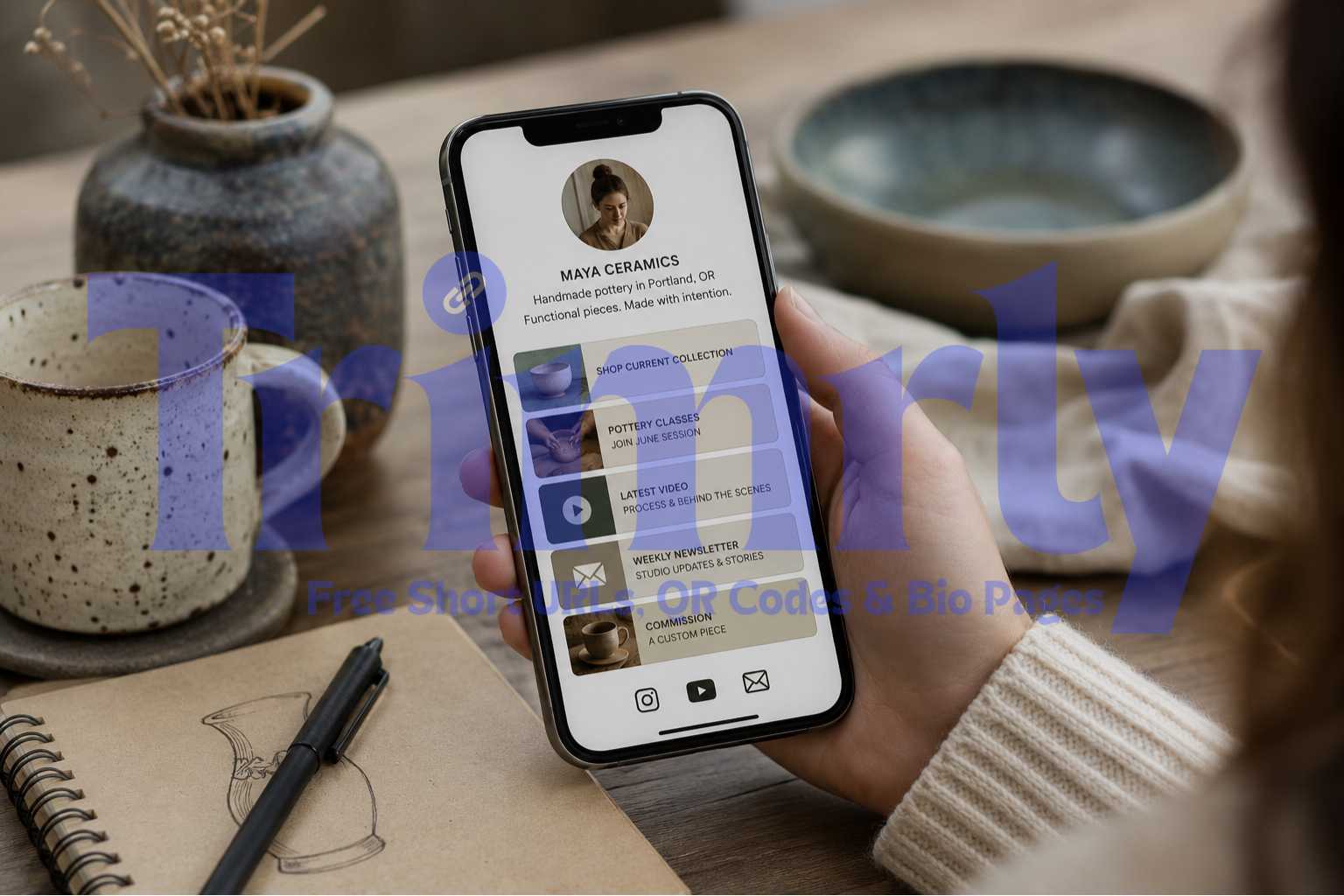
She built a Trimrly bio page with five buttons: her Etsy shop, her current pottery class registration, her newsletter, her latest YouTube process video, and a "commission a custom piece" form. Same follower count. Same posting schedule. Within three weeks, her Instagram-driven sales were at nine to fourteen items per week, and her pottery class filled up for the first time in four months.
The single change was giving her profile visitors somewhere useful to go. Not a homepage. A curated destination built for the specific audience that arrives from Instagram.
Why a Bio Page Outperforms a Single Link Every Time
The problem with linking directly to a homepage or a single product page is context mismatch. The person arriving from Instagram just saw your content: a reel, a post, a story. They are interested in you specifically, not in a generic website experience designed for cold traffic from Google.
A bio page is built for that exact moment. It loads instantly in the browser without requiring any app. It shows your name, a short description, and a set of buttons that tell the visitor exactly what they can do next. Each button goes somewhere specific and tracks independently.
Homepage Link
Bio Page
The homepage gives visitors a navigation menu and no clear next step. The bio page gives them five specific actions, each one labeled clearly. No guessing. No scrolling. No navigation to figure out. The person who tapped your bio link is already interested. The bio page respects that by giving them direct paths instead of a generic introduction.
"A homepage is built for strangers. A bio page is built for fans. They need completely different things."
A Real Example: From 3 Sales a Week to 14
Maya, Ceramics Artist · 11,400 Instagram Followers
Maya had been on Instagram for three years and built an engaged following around her handmade pottery. Her profile averaged 1,100 visits per week. Her bio linked directly to her Etsy homepage, which showed 200+ listings with no particular ordering or priority. Visitors arrived, saw a wall of products, and most left without buying.
She built a Trimrly bio page in about 25 minutes. The page had five buttons in priority order: her current seasonal collection (a curated Etsy selection, not the full shop), her June pottery class registration, her latest YouTube video, her newsletter signup, and a Google Form for custom commissions. The bio page URL replaced her Etsy link in her Instagram bio that same afternoon.
She checked the bio page analytics at the end of the first week. The pottery class button had 94 clicks. The seasonal collection button had 187 clicks. The commission form had 41 clicks. Her newsletter had 38 new signups. Total bio page visits that week: 412, compared to roughly 80 clicks her old Etsy link had been receiving. Her pottery class, which had not filled since winter, was fully booked within 11 days.
Trimrly vs Linktree: What the Free Plan Actually Gives You
Most people default to Linktree because it is the most recognizable name. Here is the honest comparison of what each free plan includes.
| Feature | Trimrly (Free) | Linktree (Free) |
|---|---|---|
| Bio pages per month | 5 per month | 1 page only |
| Per-button click tracking | Yes, full analytics | Basic only |
| Device and location data | Yes | Paid only |
| Short links included | 50 per month | No |
| QR codes included | 20 per month | No |
| Custom background and colors | Yes | Limited themes |
| Linktree branding removed | No forced branding | Linktree logo on free |
| Analytics data expiry | Permanent | 28 days on free |
The two gaps that matter most for anyone making decisions based on their bio page data are the device and location tracking, which Linktree puts behind a paywall, and the analytics expiry, which wipes 28 days of data on the Linktree free plan. Trimrly stores click data permanently on the free plan with no expiry and no credit card required.
How to Create Your Bio Page on Trimrly (Step by Step)
Create a free Trimrly account
Go to trimrly.com/user/register. No credit card. Takes about 60 seconds. The free plan gives you 5 bio pages per month, 50 short links, 20 QR codes, and permanent analytics on everything.
Go to the bio page creator
From your dashboard, go to trimrly.com/free-bio-pages-creator. You will see a live preview panel on one side and an editing panel on the other. Changes appear in real time as you type.
Add your profile details
Upload a profile photo or paste an image URL. Add your name and a short one-line description. Keep the description specific: "Handmade ceramics in Portland" beats "Creative maker and artist" because it immediately tells visitors what you do and where you do it.
Add your buttons in priority order
Add each link as a button. Put your most important action first: the thing you most want your Instagram audience to do right now. Label buttons with action verbs: "Shop the collection," "Book a class," "Watch the latest video." Avoid vague labels like "Click here" or just your website name.
Choose your colors and background
Select a background color or gradient that matches your brand. Use your brand's primary color for the top button, which should be your primary call to action. Keep the page clean: five to seven buttons maximum. More than that and click rates on each individual button drop significantly.
Copy your bio page URL and paste it into Instagram
Trimrly gives you a URL for your bio page. It looks like trimrly.com/yourname. You can also use a custom alias. Open Instagram, go to Edit Profile, paste the URL into the Website field, and tap Done. Your bio page is now live and tracking every tap from this moment forward.
Test it yourself before sharing
Tap your own bio link from the Instagram app. Confirm the bio page loads correctly, all buttons work, and the page looks good on your phone screen. Then check your Trimrly analytics dashboard and confirm those two test clicks registered. If they appear, your setup is working and every future click is tracked automatically.
Build Your Instagram Bio Page Free
5 bio pages per month. Per-button click tracking. Permanent analytics. No credit card. No Trimrly branding forced on your page.
What to Put on Your Bio Page (By Account Type)
The buttons that work best depend on what your Instagram account is actually trying to accomplish. Here is a breakdown by the most common account types.
E-commerce Brand
Current sale or featured collection first. New arrivals second. Customer reviews or UGC page third. Email list signup fourth.
Shop-first layout
Creator / Artist
Commissions or bookings first. Latest content second (YouTube, TikTok, podcast). Shop or prints third. Newsletter fourth.
Booking-first layout
Restaurant / Food
Menu or reservation link first. WhatsApp ordering second. Online ordering app third. Google review page fourth.
Action-first layout
Consultant / Coach
Booking calendar first. Free resource or lead magnet second. Testimonials or case study page third. Podcast or YouTube fourth.
Lead-gen layout
Musician / Performer
Latest release or album first (Spotify/Apple Music). Tour dates and tickets second. Merch third. YouTube music video fourth.
Stream-first layout
Real Estate Agent
Current listings first. Book a consultation second. Neighborhood guide or resource third. WhatsApp direct message fourth.
Listings-first layout
Reading Your Bio Page Analytics
Most people check their total bio page visits, feel good about the number, and close the dashboard. The per-button click data is where the actual decisions live.
Which button gets clicked most
This tells you what your Instagram audience actually wants from you right now. If your "Watch the video" button gets three times more clicks than your "Shop the collection" button, your audience is in content mode, not buying mode. That is useful feedback for both your content strategy and your posting schedule.
Click-to-visit ratio per button
Divide each button's click count by your total bio page visits. A button with a 25% click rate is strong. Under 5% means the label is unclear, the button is too far down the page, or that destination is simply not what your current audience wants. Move the button up or rewrite the label before removing it.
Device split
Bio pages are almost entirely mobile traffic. If your analytics show 97% mobile and your button destination is a page that loads slowly on cellular, you will lose those visitors before the page finishes rendering. Device data makes this visible before it becomes an ongoing conversion problem.
Peak click times
The hours when your bio page gets the most clicks are the hours when your audience is most actively browsing Instagram. Posting new content in the 30 minutes before that peak consistently outperforms posting during the valley hours, because your content is fresh when the most people are looking.
Your Instagram bio contains the Trimrly bio page URL. The URL never changes. When your offers, content, or priorities change, log into Trimrly and update the buttons on the bio page. The update is live immediately. Everyone who taps your bio link after that moment sees the updated page. You do not need to edit your Instagram bio again.
Connecting Your Bio Page to Short Links and QR Codes
A bio page does not live in isolation. It fits into a larger link ecosystem that Trimrly's free URL shortener and QR code generator both connect to.
Each button on your bio page is itself a tracked link. If you also want to share those same destinations through WhatsApp broadcasts, email newsletters, or printed materials, create short links for each destination through Trimrly. The short links and the bio page buttons point to the same places, but each tracks separately, so you can see whether your Instagram bio or your WhatsApp message drove more traffic to the pottery class registration.
For physical promotions: generate a free QR code that links to your bio page. Print it on packaging, business cards, flyers, or a window sticker. Every scan lands on the same bio page your Instagram audience uses. The QR code scan data appears in a separate analytics view in your Trimrly dashboard, so you can compare offline-to-bio traffic versus Instagram-to-bio traffic in one place.
One Trimrly free account gives you: a bio page for your Instagram bio, short links for WhatsApp and email sharing of each destination, QR codes for physical touchpoints, and permanent analytics on all three, tracked separately in one dashboard. No paid plan required for any of it.
Bio Page Mistakes That Kill Click Rates
- ✕
Too many buttons. More than seven buttons reduces individual click rates significantly. Every button you add divides the visitor's attention. If everything is a priority, nothing is. Audit your buttons monthly and remove any that consistently get under 3% of bio page visits.
- ✕
Vague button labels. "My website," "Click here," and "Learn more" tell the visitor nothing about what is on the other side of the tap. Specific labels like "Shop the summer collection" or "Book a free 20-minute call" convert significantly better because they set expectations before the click.
- ✕
Never updating the page. A bio page with the same buttons for six months sends a signal that the account is not active or does not have anything new to offer. Refresh at least one button every two to four weeks to keep the page feeling current.
- ✕
Not mentioning it in your content. Most profile visits happen because someone saw your content and wanted to know more. Saying "link in bio" in your captions, stories, and reels is not optional. It is the trigger that sends people to your bio in the first place.
- ✓
Leading with your most time-sensitive offer. If you are running a sale, releasing something new, or have limited availability on a service, that button should be first. Seasonal relevance at the top of the page consistently outperforms a static permanent layout.
- ✓
Checking analytics every Monday. A weekly Monday review of which buttons got clicked the most in the past seven days takes four minutes and tells you what your audience wanted from your content last week. Use that to decide what to post next.
Frequently Asked Questions
A link in bio page is a simple mobile-optimized web page with multiple clickable buttons, each pointing to a different destination. Instagram only allows one clickable link in your bio. A bio page turns that single link into a hub with as many destinations as you need: your shop, your latest video, your newsletter, your booking form, and anything else you want your audience to reach. Every button tracks its own clicks independently so you can see which destinations your Instagram audience actually uses.
Yes. Trimrly's free plan includes 5 bio pages per month with full per-button click analytics, device and location data, and permanent analytics storage with no expiry. No credit card is required. The free plan also includes 50 short links and 20 QR codes per month, all with the same analytics included. There is no Trimrly branding forced on your bio page on the free plan.
Between three and seven buttons is the range where individual click rates stay healthy. Below three, you are not giving visitors enough options. Above seven, the page becomes overwhelming and click rates on each individual button drop. Five buttons is the most common high-performing layout. Put your highest-priority action first and audit the others monthly using your click analytics.
Yes. This is one of the core advantages of a bio page over linking directly to individual destinations. Your Instagram bio contains the Trimrly bio page URL, which never changes. When your offers, content, or priorities change, you edit the buttons inside the bio page through your Trimrly dashboard. The update is live instantly. Your Instagram bio stays exactly the same.
Both create link in bio pages. The key differences on the free plan are that Trimrly includes device and location data in its analytics while Linktree puts these behind a paid plan, Trimrly stores analytics permanently while Linktree expires free analytics after 28 days, and Trimrly includes 50 short links and 20 QR codes per month while Linktree focuses only on the bio page itself. Trimrly also does not add its own branding to your bio page on the free plan.