.jpg)
A content creator in Austin, Texas switched from Linktree to Trimrly after 14 months on Linktree's free plan. Her reason was not frustration with Linktree's link management. It was simple: she had embedded a Spotify playlist on her Linktree page, only to find it was decorative but not functional for her audience without a paid upgrade. She wanted a WhatsApp button, a Calendly block, and a YouTube video embed. Each time she looked at what she needed, she hit a restriction.
On Trimrly's free plan, every one of those widgets was available out of the box. No upgrade prompt. No trial countdown. No "this feature is Pro only" modal.
This is the actual difference between the two free plans in 2026. Not the brand name. Not the template quality. The widget library and what sits behind a paywall versus what does not.
The Assumption That Needs Updating
Linktree's positioning created a mental model that stuck: the free plan is a taste, the paid plan is the product. That model made sense when Linktree was the only serious option. It does not make sense when a competitor offers full functionality for free and makes money through volume and optional paid upgrades rather than feature gating.
The question to ask about any bio page tool's free plan is not "does it work?" Every free plan works. The question is: does it stop working the moment you try to do anything beyond the absolute basics?
Linktree's free plan answers yes. Trimrly's answers no. Here is the breakdown of exactly where each one stops and starts.
"The definition of 'basic' in bio link tools has changed. What Linktree charges $15 a month for, others give away free. That is not a marketing claim. It is a feature list."
What Linktree's Free Plan Includes (and Excludes) in 2026
Linktree's free plan is built for one primary use case: organizing links into a single page. For that use case it works reliably. The limitations reveal themselves the moment your needs expand beyond a stack of text links.
The analytics restriction is the most consequential limitation for any creator trying to grow. Linktree's analytics on the free plan tell you total clicks and views, nothing more. Device data, geographic data, referral sources, and data beyond 28 days are all paywalled. This means you cannot tell whether your audience is on mobile or desktop, which country they come from, or how this month's traffic compares to last month.
The seller fee is the most financially consequential for creators who monetize. Linktree charges a 12% seller fee on every digital product sale made through the free plan, in addition to standard payment processing fees. On $500 in monthly product sales, that is $60 paid to Linktree before Stripe or PayPal takes its cut.
What Trimrly's Free Plan Actually Gives You
Trimrly's free plan operates on a different philosophy: give creators real tools and earn through optional upgrades and volume, not by gatekeeping the features people actually need.
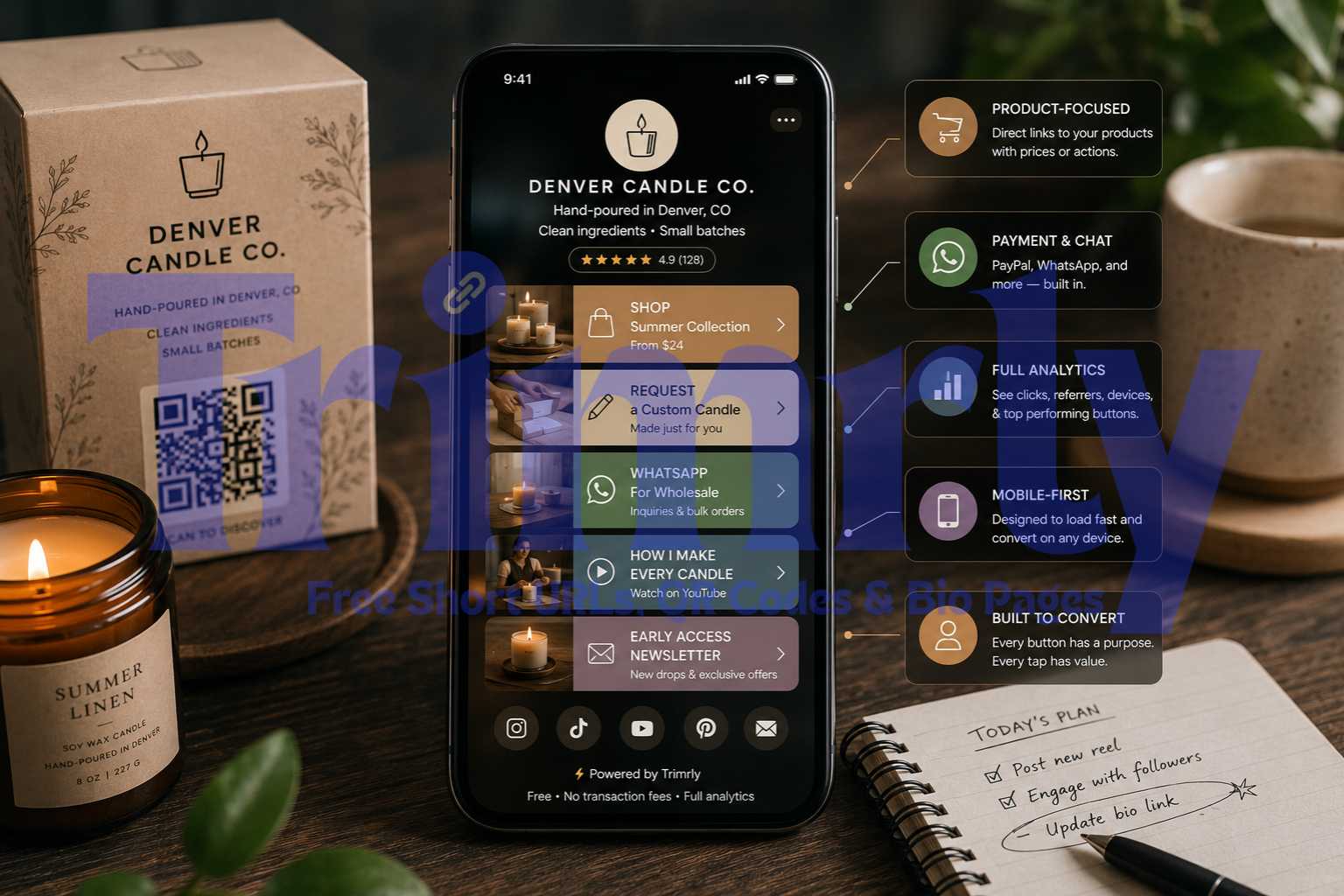
The free plan includes 5 bio pages per month with all 45+ widgets enabled by default. There is no tier of widgets that requires upgrading. No "Pro widget" label on Spotify embeds or Calendly blocks. Every widget in Trimrly's library is available from the first day of a free account.
Every chip in that grid is available on the free plan from day one. No upgrade required for any of them. The free plan is the full product, not a preview of it.
Beyond the bio page itself, the same free account also gives you 50 short links and 20 dynamic QR codes per month, each with their own analytics. A Linktree account handles one thing. A Trimrly account handles three: bio pages, short links, and QR codes, all tracked in one dashboard.
The Full Feature Comparison: Free Plan vs Free Plan
| Feature | Trimrly Free | Linktree Free |
|---|---|---|
| Bio pages per month | 5 per month | 1 page (unlimited links) |
| Widgets available | 45+ all unlocked | Basic links + limited embeds |
| Analytics depth | Full: device, country, referrer | Clicks + views only |
| Analytics data retention | Permanent, never deleted | 28 days then wiped |
| Short links included | 50 per month | No |
| QR codes included | 20 per month, dynamic | 1 static QR for page URL |
| WhatsApp widget | Yes, message + call | No |
| Calendly embed | Yes, free | No |
| Spotify embed | Yes, free | Limited |
| YouTube embed | Yes, video + playlist | Basic embed |
| Contact form | Yes, free | No |
| Email collection / Newsletter | Yes, free | Paid only |
| Google Maps embed | Yes, free | No |
| OpenTable / EventBrite | Yes, free | No |
| Live chat widgets (Intercom, Tidio) | Yes, free | No |
| PayPal payment button | Yes, free | Blocked on free plan |
| Seller transaction fee | 0% | 12% on free plan |
| Forced platform branding | No forced branding | Linktree logo present |
The Real Cost Comparison: What 100 Digital Sales Actually Look Like
Most cost comparisons between bio link tools focus on monthly plan pricing. That is the wrong frame for creators who sell anything. The fee structure on transactions matters more than the plan cost for anyone generating real revenue through their bio link.
At $2,000 in monthly sales, Linktree's free plan costs you $240 per month before payment processing. Over a year, that is $2,880 paid to Linktree from a plan advertised as free. Trimrly charges zero on transactions because it does not operate a commerce revenue-share model.
At $500 in monthly sales: Linktree takes $60. Trimrly takes $0. At $2,000 per month: Linktree takes $240. Over 12 months at that volume: $2,880 in fees from a "free" plan. The fee only drops (not disappears) if you pay $24 per month for Linktree Premium. That is $288 per year to reduce a fee that should not exist in the first place.
Widget Depth: Why 45+ Matters More Than a Count
Numbers are easy to dismiss. "45+ widgets" sounds like a marketing headline until you map specific widgets to specific use cases and realize how many of those use cases are genuinely blocked on Linktree's free plan.
For restaurants and local businesses
A restaurant bio page needs four things: a menu link, a reservation system, a WhatsApp contact, and a Google Maps location. On Trimrly's free plan, all four are available as dedicated widgets. The OpenTable Reservation block, the Google Maps embed, and the WhatsApp Message widget are all included without any upgrade. On Linktree, three of those four require workarounds: a plain link instead of a proper reservation block, no WhatsApp widget, and no maps embed.
For musicians and podcasters
A musician's bio page typically needs Spotify, Apple Music, YouTube, SoundCloud, and a direct link to ticket sales or tour dates. Trimrly includes all five as dedicated embed widgets on the free plan. Spotify loads as an interactive player, not just a link. YouTube embeds as a playable video directly on the bio page. Listeners do not leave the page to hear a preview.
For coaches and service businesses
A coach who books paid sessions needs a scheduling widget and ideally a contact form or newsletter capture. Linktree on the free plan blocks email collection entirely and has no native Calendly integration. Trimrly includes both the Calendly embed and a Newsletter widget on the free plan. A visitor can book a session or sign up for a newsletter without leaving the bio page.
For e-commerce sellers
Trimrly's Product widget lets you showcase items with images and links directly on the bio page. The PayPal Button widget enables direct payment collection. Linktree blocks PayPal buttons entirely on the free plan and charges 12% on any digital product sales it does allow.
A widget is not the same as a link. A link is text that redirects. A widget is an embedded, interactive element on the page itself. A Spotify embed lets visitors play a preview without leaving. A Calendly widget lets them book without navigating away. A contact form lets them send a message without opening their email client. Widgets convert better than links because they reduce the steps between intent and action.
45+ Widgets. Free. No Transaction Fee.
5 bio pages per month, full analytics, short links, QR codes, and every widget available from day one. No credit card. No upgrade prompts on features you actually need.
Analytics: The Feature That Changes How You Create
This is the section most comparison articles skip, because analytics feel abstract until you have had them and lost them. Or until you have never had them and realize you have been flying blind.
Linktree's free analytics tell you total page views and total link clicks. That is a single number for each metric. It tells you something happened. It does not tell you who the audience is, where they came from, what device they were on, which specific button got the most clicks, or whether the numbers this week are better or worse than last month (because last month's data was deleted after 28 days).
Trimrly's free analytics include per-button click tracking, device breakdown (mobile vs desktop vs tablet), operating system data, country and city breakdown, referral source, timestamp for each click, and all of this stored permanently with no expiry date.
That difference changes three specific decisions a creator makes regularly:
- ✓
What to feature next on the bio page. If the "Book a session" button gets four times more clicks than "Watch my latest video," your audience is in a conversion mindset, not a content-browsing mindset. Put the booking button first and watch click rates improve without changing anything else.
- ✓
Whether your landing page works on the device your audience actually uses. If 91% of bio page clicks come from mobile and your destination loads in 6 seconds on cellular, device data tells you where the conversion drop happens. Total click counts tell you nothing about this.
- ✓
Which Instagram posts actually drive bio link clicks. Referral source data shows whether a traffic spike came from a specific story, reel, or post. You can recreate what worked because you can see what worked, not just that something did.
How to Switch from Linktree to Trimrly in Under 10 Minutes
The concern most creators have about switching is the same as switching any tool: losing something, breaking something, or having to redo work. None of those apply here. The switch takes about 10 minutes and requires no technical knowledge.
Create a free Trimrly account
Go to Create Free Account. No credit card. Takes 60 seconds. You get 5 bio pages, 50 short links, and 20 QR codes immediately on the free plan.
Build your bio page using Trimrly's widget library
Go to Create Free Bio Pages. Add your profile photo, name, and description. Then add your widgets: links, YouTube video, Spotify embed, WhatsApp button, Calendly block, or whichever combinations match what you were trying to build on Linktree. All of them are available in the same editor without any gating.
Copy your Trimrly bio page URL
Trimrly gives you a URL for your bio page (trimrly.com/yourname or a custom alias). Copy it. You do not need to delete your Linktree account at this point. Just leave it inactive.
Update your Instagram (and other) bio links
On Instagram, go to Edit Profile and replace the current link in your bio with your new Trimrly bio page URL. Repeat on TikTok, YouTube, Twitter/X, and anywhere else you link from your profile. The entire update across four platforms takes about three minutes.
Check your analytics dashboard after 24 hours
Log into Trimrly and check the bio page analytics. You will see click data per button, device breakdown, country, and referral source for every tap since you updated your bio. That data is yours permanently. No 28-day window. No surprise deletion next month.
When Linktree Free Actually Makes Sense
This comparison is not an argument that Linktree is bad. It is an argument that the assumption "free bio page tool = basic" is outdated and was built on Linktree's specific business model.
Linktree's free plan is genuinely the right choice in specific situations:
- You only need to share plain links. No embeds, no widgets, no WhatsApp, no booking. If your bio page is five links to YouTube, Spotify, your website, your newsletter, and your merch store, Linktree handles that fine.
- You sell nothing through your bio link. The 12% fee is irrelevant if you never trigger it.
- You are starting out and want the simplest possible entry point. Linktree's name recognition means some audiences trust it immediately. That is a real, if soft, advantage.
Outside these three scenarios, the case for Linktree's free plan over Trimrly's free plan is difficult to make on features alone.
Frequently Asked Questions
Trimrly's free plan includes over 45 widgets, all enabled by default with no gating. These span content blocks (links, headings, text, images, video, PDF), social embeds (YouTube, Spotify, Apple Music, TikTok, Instagram, SoundCloud, Twitter), communication tools (WhatsApp message and call, contact form, newsletter, vCard, phone call), and business widgets (Calendly, Google Maps, OpenTable, PayPal button, EventBrite, product blocks, live chat widgets including Intercom, Tidio, and Tawk.to). No widget requires a paid upgrade to use.
No. Trimrly does not charge a platform transaction fee on any sales or payments made through bio page widgets. Standard payment processor fees from PayPal or Stripe apply, but Trimrly does not take a percentage of sales on either the free or paid plan. This contrasts with Linktree's free plan, which charges a 12% seller fee on digital product sales.
Trimrly stores analytics data permanently with no expiry date on the free plan. Every click, device, country, and referral source recorded since your bio page launched stays in your dashboard indefinitely. This is a direct contrast to Linktree's free plan, which deletes analytics data after 28 days, preventing any month-over-month comparison or long-term performance review.
Yes. Both Calendly and WhatsApp (message and call) are available as widgets on Trimrly's free plan with no upgrade required. The Calendly embed lets visitors book appointments directly on your bio page without navigating away. The WhatsApp widgets open a direct chat or call when tapped. Neither widget is gated behind a paid tier.
No. Trimrly does not force its branding onto your bio page on the free plan. Your page shows your name, your photo, your colors, and your content. Some tools including Lnk.Bio and Taplink show a platform watermark on free plan pages. Trimrly and Linktree both avoid this on their free plans, though Linktree does restrict the level of color and theme customization available without a paid upgrade.