A fitness creator in Nashville posted 60 TikToks in two months. Her videos were getting 40,000 to 200,000 views each. Her profile was getting 3,000 to 8,000 visits per week. Her bio link was pointing to her gym's general homepage. She was getting 80 clicks per week from all that traffic.
She changed the link to a free 7-day meal plan download, added "free meal plan in bio" to her next three videos, and checked the numbers a week later. Bio link clicks went from 80 to 640 in seven days. Same follower count. Same posting frequency. Same audience. The only change was what the link pointed to and whether her content told people to go there.
That gap between potential and actual clicks is where most TikTok bio link strategy begins and ends.
TikTok Bio Link Requirements in 2026 (What Actually Changed)
There has been ongoing confusion about who can add a clickable link to their TikTok bio. The requirements shifted in mid-2024 and have stayed consistent through 2026, though different sources still report different rules. Here is the current state based on verified sources.
| Account Type | Bio Link Access | Music Library | Best For |
|---|---|---|---|
| Personal Account | Yes (all accounts, 2024+) | Full library | Creators, individual users |
| Business Account | Yes (immediate) | Commercial Music Library only | Brands, businesses, shops |
| Under 18 accounts | Restricted by region | Full library | N/A |
The Website field that holds your bio link only appears inside the TikTok mobile app. You cannot add or edit your bio link from TikTok's desktop web interface. Go to Profile, tap Edit Profile, and look for the Website field. If it does not appear, update your app, log out and back in, and try again.
The trade-off with business accounts is worth understanding before you switch. Business accounts gain immediate bio link access with no follower requirement. They also lose access to TikTok's mainstream music library, which is restricted to the Commercial Music Library for accounts doing any form of promotion. For creators whose content relies heavily on trending audio, this restriction can affect how videos perform on the algorithm.
For most creators in 2026, keeping a personal account is the right call. The follower-minimum removal in 2024 means there is no longer a meaningful reason to switch to business just to unlock the bio link.
Why Most TikTok Bio Links Underperform
A 3% to 8% click-through rate sounds low. It is not as low as it sounds when you understand the math. A creator with 50,000 followers getting 10,000 profile visits per week at a 5% click rate is generating 500 bio link clicks weekly with zero ad spend. The problem is that most accounts convert significantly below 3% because of three specific errors.
Error 1: Linking to a homepage
A homepage is built for cold traffic that needs to understand who you are. TikTok traffic comes from short, engaging videos, so the landing page needs to match that energy and immediacy. A viewer who tapped your bio link after watching a 30-second video on a specific topic has high intent around that topic. A homepage with navigation, a hero banner, and general brand messaging breaks that intent. They arrived curious about something specific and found something generic.
Error 2: Never referencing the link in video content
The average TikTok viewer does not instinctively check a creator's bio after watching a video. They need a reason and a cue. Bio link click-through rates typically range from 3-8% of profile views, depending on your niche and how well you promote the link in your content. The word "promote" is key. Creators who say "link in bio" at the right moment in a video see materially higher click rates than those who assume the audience will discover it on their own.
Error 3: A link that never changes
TikTok audiences respond to novelty and urgency. A bio link that stays the same for six months sends a signal that there is nothing new or time-sensitive on the other side. Update your bio link when you have new campaigns, products, or content to promote. Many successful creators change their link weekly or monthly to stay current. A short link from Trimrly lets you update the destination without touching your TikTok bio, so the URL stays clean and readable while the destination stays relevant.
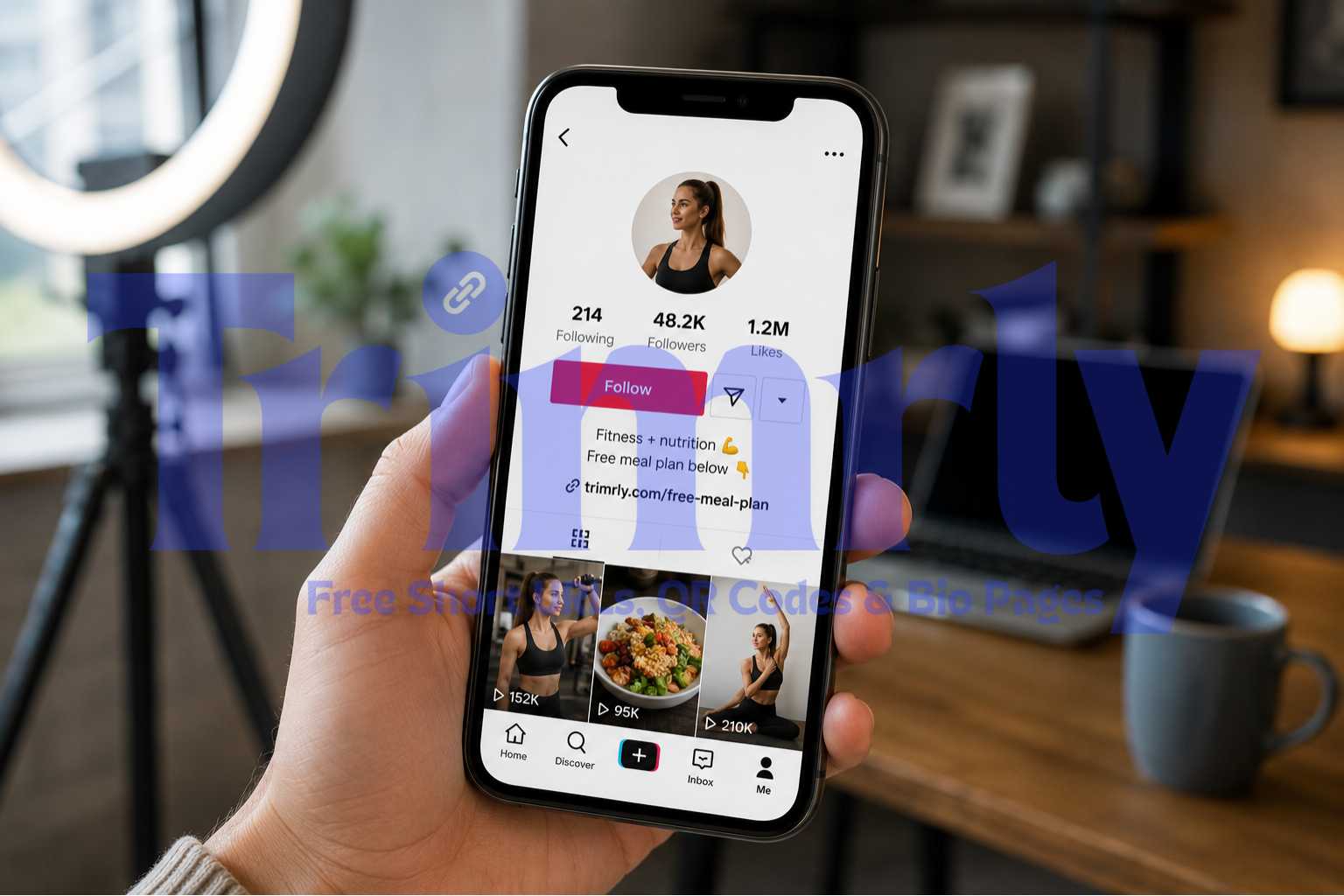
Both profiles have the same follower count. The second one converts significantly better for three reasons: the bio text references the link directly, the link is short and readable, and the destination is specific enough that a visitor knows what they are getting before they tap.
What to Actually Put in Your TikTok Bio Link
The right destination depends on your primary goal. Here is a breakdown of the best options by account type, with an honest assessment of what each one does well and where it falls short.
Free Lead Magnet
A free download, guide, checklist, or resource. This converts best on TikTok because it matches the "value first" expectation TikTok audiences have. Low commitment, immediate reward.
Highest conversion
Bio Page (Multi-Link)
A page with multiple buttons: your shop, latest video, newsletter, booking link. Use this when you have more than one thing to promote. One link in TikTok bio, multiple destinations for the visitor.
Most flexible
Direct Booking Page
Coaches, consultants, and service providers: a Calendly or booking link that lets viewers schedule directly. Works best when videos show your expertise and end with a clear consultation offer.
High intent traffic
Specific Product Page
Link to one specific product or collection, not your whole store. A viewer who watched your video about a specific item should land on that item's page, not your homepage with 200 products.
Works well
Newsletter Signup
For creators building an owned audience. Works best when you reference the newsletter specifically in videos and offer something for signing up, rather than asking people to subscribe with no context.
Good for audience building
Your Homepage
Rarely converts well from TikTok traffic. Homepages are designed for exploratory visitors. TikTok visitors arrive with specific intent from a specific video. A general homepage breaks that intent immediately.
Avoid as default
"TikTok sends you discovery traffic. Discovery traffic needs a specific, low-friction destination. Not a homepage. Not a store with 400 items. One thing, one step, one tap."
When One Link Is Not Enough: Using a Bio Page
TikTok only allows one URL in the bio field. That is the rule. But the destination of that one URL can be a page with as many buttons as you need.
A Trimrly bio page is a mobile-first page with multiple buttons, each pointing to a different destination, each tracked individually. You put the bio page URL into your TikTok bio. When a visitor taps it, they land on a page with your most important links clearly arranged. Every button tap is recorded separately, so you can see which destination your TikTok audience actually uses most.
This solves the core problem: one link, multiple purposes. Here is what a well-structured TikTok bio page looks like for different creator types:
| Creator Type | Button 1 (First, Priority) | Button 2 | Button 3 | Button 4 |
|---|---|---|---|---|
| Fitness creator | Free meal plan download | Book a coaching call | My supplement picks | YouTube workouts |
| Musician | New single on Spotify | Tour dates and tickets | Merch store | YouTube channel |
| Small business | Shop the collection | WhatsApp to order | Book an appointment | Read Google reviews |
| Coach / consultant | Free 20-min consult | Download free guide | Join the newsletter | Read client results |
| Food / restaurant | View our menu | Make a reservation | Order via WhatsApp | Leave a Google review |
The first button is your primary call to action for the current moment. Put your most time-sensitive or highest-converting offer there. Everything else is secondary. When your priorities change, update the bio page in Trimrly without touching your TikTok bio. The link stays the same. The destination adapts.
One Link. Multiple Destinations. All Tracked Free.
Create a Trimrly bio page for your TikTok bio in under 5 minutes. See which buttons your audience actually taps. Free, no credit card.
How to Add Your Link to TikTok (Step by Step)
Create your destination first
Before opening TikTok, decide what you are linking to. If it is a bio page, build it at Create Free Bio Pages. If it is a single URL, shorten it at Create Free Short Links and set a readable alias. Copy the final URL.
Open TikTok on your phone (not desktop)
The Website field only appears in the TikTok mobile app. This is not a setting or a bug. It is how TikTok has designed the profile editor. Desktop editing does not show this field.
Go to Profile and tap Edit Profile
Tap the Profile icon at the bottom of the screen. Tap "Edit profile" below your follower stats. You will see fields for your name, username, bio, and website.
Tap the Website field and paste your URL
Tap the Website field. Paste your Trimrly short link or bio page URL. Make sure the URL starts with https://. TikTok will not make a link clickable without the protocol prefix.
Save and test immediately
Tap Save. Go back to your profile and tap the link to confirm it is clickable and redirects to the correct destination. Check your Trimrly analytics dashboard after a few minutes to confirm the test click registered. If it does, every future click from your TikTok bio is now being tracked.
Three things to try: update the TikTok app to the latest version, log out and back into your account, then check again. If the field still does not appear, your account may be flagged for a community guideline issue. Check your account status under Settings and Privacy before concluding it is a platform restriction.
How to Get More People to Actually Click Your Bio Link
The link being there is the minimum. Getting people to click it requires a small but consistent effort in your content.
Say "link in bio" at the right moment in your video
The right moment is when viewer interest is highest: right after you have delivered the most valuable part of the video. Not at the beginning when they have not yet decided if the content is worth their attention. Not at the very end after they have mentally moved on. The 70% to 80% mark of a video, right after the payoff, is where "grab the free guide in my bio" lands most effectively.
Make the bio text reference the link
Creators with clear, professional bios see 2.5x higher profile-to-follower conversion rates than those with generic ones. The same principle applies to link clicks. A bio that says "Free meal plan below 👇" next to the link converts better than one that says "Fitness lover and recipe creator." The arrow emoji is not decoration. It is a direction. People on mobile follow visual cues.
Pin a video that references your bio link
Pinned videos appear at the top of your profile grid and get a higher impression weight from TikTok. Pin a video that specifically demonstrates the value of what is in your bio link. If the link goes to a free recipe guide, pin a cooking video that naturally leads into "grab the full recipe in my bio." Every new profile visitor sees that video first.
Use a short, readable link
TikTok displays your bio link as text below your bio. A long URL with tracking parameters, session IDs, or random characters looks untrustworthy on a profile. A short link like trimrly.com/free-plan or trimrly.com/yourname-shop is readable before the tap, which increases the likelihood that visitors click without hesitation.
Tracking Your TikTok Bio Link Clicks
TikTok's native analytics show profile views but not bio link clicks specifically. To see exactly how many people are tapping your bio link and what they do next, you need a tracking layer at the link level.
A Trimrly short link as your bio link destination records every click with timestamp, device type, operating system, and referral source. When someone taps your TikTok bio link, that click appears in your Trimrly dashboard within seconds. You can see how many clicks you got today, this week, and this month, with device and location breakdown.
If you are using a Trimrly bio page as your destination, each button on the page tracks its own clicks separately. After two weeks you can see whether your TikTok audience clicks the "Book a call" button more than the "Free guide" button, which tells you whether they arrive in a commercial mindset or an educational one. That data changes what you put first on your bio page and what offer you reference in your next video.
Mistakes That Kill TikTok Bio Link Performance
- ✕
Using a long, unreadable URL. A URL that wraps across two lines or contains obvious tracking parameters triggers hesitation. Shorten it and give it a readable alias. trimrly.com/your-offer takes two minutes to set up and removes the friction entirely.
- ✕
Linking to a landing page that loads slowly on mobile. Bio link click-through rates typically range from 3-8% of profile views, depending on your niche and how well you promote the link in your content. The quality of that landing page then determines whether clicks convert. A page that takes 4 seconds to load on cellular loses half its visitors before they see anything.
- ✕
Never referencing the link in video content. The bio link does not promote itself. Every week you do not mention it in at least one video is a week of profile visitors who did not know what was waiting for them there.
- ✕
Keeping the same link for months. A static bio link sends a signal that nothing new is happening. Updating the destination, even to something slightly different, gives returning profile visitors a reason to tap again.
- ✓
Updating the destination without changing the URL. A Trimrly short link lets you update what the link points to from your dashboard in under 30 seconds. Your TikTok bio stays identical. The destination changes the moment you save. No reposting, no bio editing, no broken links.
- ✓
Checking your click analytics weekly. Knowing how many people tapped your bio link in the last seven days, what devices they used, and when they clicked gives you concrete data to make decisions about what to promote and when to reference the link in your content.
Frequently Asked Questions
As of mid-2024, TikTok removed the follower minimum for personal accounts. Any personal account in good standing can add a clickable bio link, regardless of follower count. Business accounts have always had immediate access to the bio link without any follower requirement. The link must be added through the TikTok mobile app, not the desktop version. Some sources still report the old 1,000-follower rule, but this requirement was removed in 2024 and has not been reinstated as of 2026.
TikTok only allows one clickable URL in the bio field. The standard workaround is to use a bio page tool like Trimrly that creates a mobile-optimized page with multiple buttons, each linking to a different destination. You put the bio page URL into your TikTok bio, and visitors can then choose between multiple options when they arrive. Each button on the bio page tracks its own clicks independently so you can see which destinations your TikTok audience uses most.
The most common causes are: trying to edit on desktop instead of the mobile app (the field only appears in the app), using an outdated version of the TikTok app, or an account standing issue triggered by a community guideline violation. Try updating the TikTok app to the latest version and logging out then back in. If the field still does not appear, check your account status under Settings and Privacy to see if any restrictions are active on your account.
TikTok bio link click-through rates typically range from 3% to 8% of profile views, meaning for every 100 people who visit your profile, three to eight will tap the bio link. Rates above 10% are considered excellent. The most effective way to raise your CTR is to reference the link explicitly in your video content, use a short and readable link, and make sure the destination matches what your content is about rather than pointing to a generic homepage.
In 2026, no. Since TikTok removed the follower minimum for personal accounts in mid-2024, there is no longer a bio link reason to switch to a business account. Business accounts give immediate bio link access but lose access to TikTok's mainstream music library, which is restricted to the Commercial Music Library. For creators whose content relies on trending audio, this trade-off is significant. Keep your personal account unless you have a business-specific reason to switch beyond the bio link.